
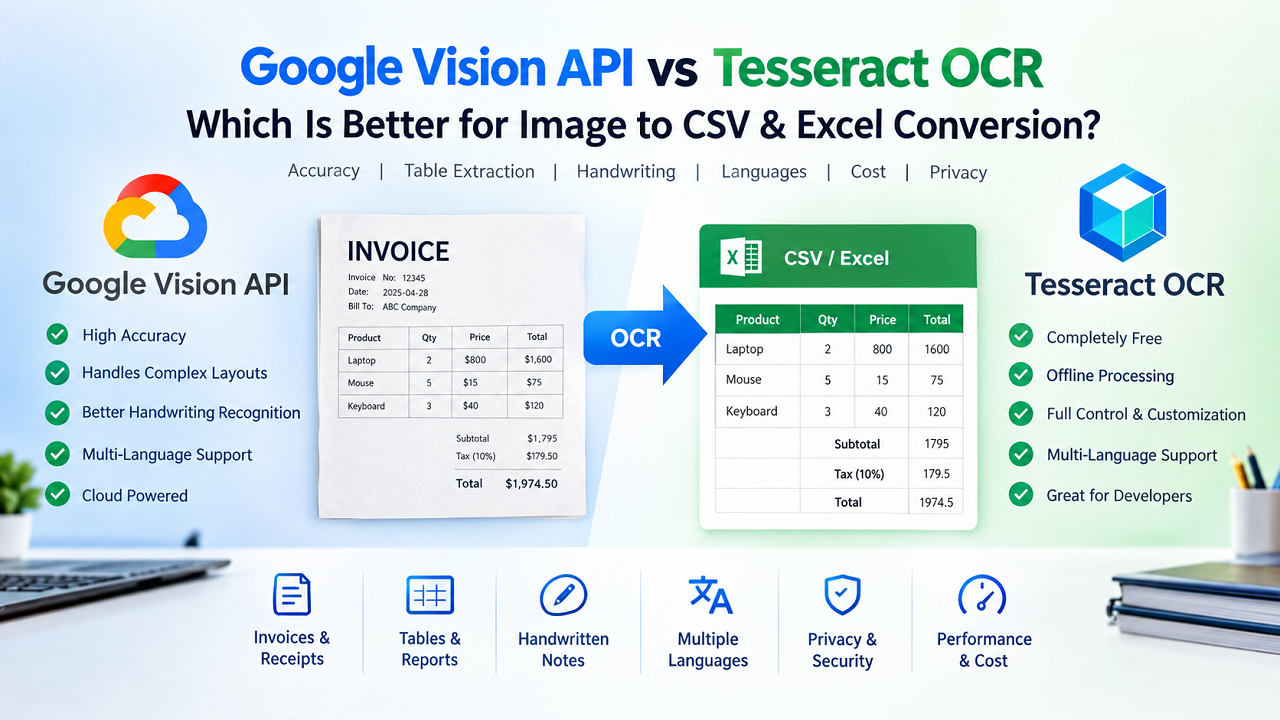
When you need to convert an image into editable data, choosing the right OCR engine can make a significant difference in both accuracy and productivity. Whether you are digitizing invoices, extracting tables from reports, processing receipts, or converting scanned documents into Excel spreadsheets, two OCR technologies are mentioned more often than almost any others: Google Vision API and Tesseract OCR.
Both are powerful, but they are built with different goals in mind.
Many comparison articles simply declare one tool as “better” than the other without explaining the situations where each performs well—or where it falls short. In reality, there is no single OCR engine that is perfect for every document, language, or workflow. The right choice depends on factors such as image quality, document layout, handwriting, processing speed, privacy requirements, internet connectivity, and budget.
This guide takes a practical approach. Instead of focusing on marketing claims, it explains how each OCR engine works, compares them across real-world scenarios, and helps you determine which one is the better fit for your specific needs.
If your goal is to convert images into structured CSV or Excel files, this article will also explain why OCR alone is only one part of the process. Detecting text is important, but preserving tables, rows, columns, and document structure is equally essential for producing usable spreadsheet data.
By the end of this guide, you will understand:
- What Google Vision API is
- What Tesseract OCR is
- How each engine recognizes text
- Which OCR performs better on different document types
- Which engine offers better table extraction
- How they compare for handwritten documents
- Privacy and security considerations
- Cost differences
- Performance in multilingual documents
- Whether using both together can improve results
- Which OCR engine is better for Image to CSV and Excel conversion
What Is OCR?
Before comparing the two engines, it is helpful to understand what OCR actually does.
OCR stands for Optical Character Recognition. It is a technology that analyzes an image and converts visible text into machine-readable text.
Imagine taking a photograph of a printed invoice. To a computer, that photograph is simply a collection of pixels. OCR software examines the shapes within the image, identifies letters and numbers, and reconstructs them into editable text.
For example, an invoice containing:
| Product | Qty | Price |
|---|---|---|
| Keyboard | 2 | $40 |
| Mouse | 1 | $15 |
can be converted into structured spreadsheet data that can be opened in Microsoft Excel, Google Sheets, or imported into accounting software.
Modern OCR systems have advanced far beyond simple text recognition. They can also:
- Detect tables
- Identify paragraphs
- Recognize multiple languages
- Read handwritten text
- Preserve document structure
- Process scanned PDFs
- Extract key-value pairs from forms
- Recognize text from photographs taken with mobile phones
However, not every OCR engine excels equally in all these areas. This is where understanding Google Vision API and Tesseract becomes important.
What Is Google Vision API?
Google Vision API is a cloud-based image analysis service developed by Google Cloud. It uses machine learning models trained on vast amounts of image data to identify and interpret visual information.
Although the service supports several computer vision capabilities such as object detection, logo recognition, label detection, face detection, and landmark identification, one of its most widely used features is Optical Character Recognition.
Unlike traditional OCR software that runs entirely on your own computer, Google Vision API processes images on Google’s cloud infrastructure. When you send an image to the API, Google’s servers analyze it and return structured OCR results within seconds.
This cloud-based approach offers several advantages.
High OCR Accuracy
Google continuously improves its OCR models using machine learning. As these models evolve, recognition accuracy often improves without requiring users to install software updates.
This makes Google Vision API particularly effective for documents with:
- Mixed fonts
- Rotated text
- Low-quality scans
- Mobile camera images
- Complex layouts
- Large documents
Excellent Handwriting Recognition
One area where Google Vision API performs especially well is handwritten text recognition.
For example, suppose you photograph a handwritten expense report created during a meeting. While handwriting varies significantly between individuals, Google’s machine learning models can often recognize neatly written handwriting with surprisingly good accuracy.
Although difficult handwriting remains challenging for any OCR system, Google Vision generally performs better than many traditional OCR engines in this area.
Supports Many Languages
Google Vision API supports OCR across a wide range of languages.
Examples include:
- English
- Spanish
- French
- German
- Italian
- Portuguese
- Dutch
- Japanese
- Korean
- Chinese
- Hindi
- Arabic
- Russian
Developers can also provide language hints, allowing the OCR engine to prioritize one or more expected languages. This often improves recognition accuracy for multilingual documents.
For example, if you know your scanned invoice is written in German, specifying German as a language hint helps the OCR engine make more accurate decisions when interpreting similar-looking characters.
Handles Complex Documents
Modern business documents rarely contain plain paragraphs.
Instead, they often include:
- Tables
- Headers
- Footers
- Stamps
- Multiple columns
- Logos
- Signatures
- Images
- Mixed formatting
Google Vision API generally handles these layouts more effectively than traditional OCR systems because its machine learning models analyze document structure rather than simply recognizing isolated characters.
This is especially useful when processing invoices, purchase orders, reports, and financial statements.
Cloud Processing
Because processing occurs on Google’s servers, users do not need powerful hardware.
Even modest computers can analyze large images because the computational work happens remotely.
The trade-off, however, is that an internet connection is required.
If your internet connection is unavailable or restricted, Google Vision API cannot process documents until connectivity is restored.
What Is Tesseract OCR?
Tesseract OCR is one of the world’s most well-known open-source Optical Character Recognition engines.
Originally developed by Hewlett-Packard in the 1980s and later maintained by Google as an open-source project, Tesseract has become one of the most widely used OCR engines among developers, researchers, businesses, and hobbyists.
Unlike Google Vision API, Tesseract runs locally on your own computer or server.
This means all OCR processing happens on your device without sending images to an external cloud service.
For organizations handling confidential or regulated information, this local processing model offers an important privacy advantage.
Completely Free
One of Tesseract’s biggest strengths is that it is completely free to use.
There are:
- no monthly subscriptions
- no API charges
- no usage quotas
- no billing account requirements
This makes it attractive for developers building OCR applications with limited budgets.
It is also a popular choice for educational projects, research, and internal business automation.
Offline Processing
Since Tesseract runs locally, it works even without an internet connection.
For example, imagine a manufacturing facility where production computers are isolated from the public internet for security reasons.
Employees can still process scanned quality-control forms using Tesseract because everything happens offline.
This capability also makes Tesseract useful in environments with unreliable internet access.
Large Language Support
Tesseract supports many languages through downloadable language data files.
Users can install only the languages they require.
For example:
eng
spa
fra
deu
ita
jpn
kor
chi_sim
chi_tra
hin
ara
Multiple languages can also be loaded simultaneously, allowing OCR of multilingual documents.
Highly Customizable
Unlike many cloud OCR services, Tesseract gives developers significant control over processing.
Developers can:
- preprocess images
- resize documents
- remove noise
- sharpen text
- deskew pages
- adjust thresholding
- customize recognition pipelines
When combined with libraries such as OpenCV, Tesseract’s accuracy can improve dramatically on difficult images.
This flexibility is one reason it remains popular despite being several decades old.
Ideal for Developers
Because it is open source, Tesseract integrates easily into custom software.
It is commonly used in:
- desktop applications
- mobile apps
- Python automation
- JavaScript OCR
- document management systems
- invoice processing tools
- browser-based OCR applications
In fact, many online OCR tools use Tesseract as either their primary OCR engine or as a fallback when cloud OCR services are unavailable.
How Do Google Vision API and Tesseract OCR Actually Recognize Text?
Although both Google Vision API and Tesseract OCR are designed to convert images into editable text, the way they perform OCR is fundamentally different. Understanding these differences helps explain why one engine may outperform the other depending on the type of document you are processing.
How Google Vision API Works
Google Vision API uses cloud-based artificial intelligence and deep learning models that have been trained on billions of text samples, documents, photographs, and handwritten examples.
When you upload an image, the OCR process generally follows these stages:
Step 1: Image Preprocessing
Google first analyzes the uploaded image to improve recognition quality. During this stage, it automatically attempts to:
- Correct image orientation
- Improve contrast
- Reduce image noise
- Detect document edges
- Normalize lighting
- Separate text from the background
This automatic preprocessing reduces the need for users to edit images manually before OCR.
Step 2: Layout Analysis
Instead of reading one character at a time, Google Vision first analyzes the overall structure of the page.
It attempts to identify:
- Paragraphs
- Tables
- Text blocks
- Multiple columns
- Lists
- Headers
- Footers
This structural understanding is one reason Google Vision performs well on business documents.
Step 3: Character Recognition
Using deep neural networks, Google predicts individual characters while also considering the surrounding words and sentence structure.
For example, imagine the OCR encounters this blurred word:
Invo1ceRather than interpreting the “1” literally, the AI recognizes that “Invoice” is statistically much more likely.
This contextual prediction improves overall accuracy.
Step 4: Structured Output
Google returns OCR results containing:
- complete text
- paragraphs
- detected languages
- word positions
- confidence information
- page structure
Developers can use this information to rebuild tables or extract structured business data.
How Tesseract OCR Works
Tesseract follows a different philosophy.
Instead of relying entirely on cloud AI models, it performs OCR locally using trained language data.
Modern versions of Tesseract (version 4 and above) also use Long Short-Term Memory (LSTM) neural networks, which significantly improved recognition compared to earlier versions.
The OCR process generally includes:
Step 1: Image Preparation
Tesseract works best when images are already clean.
For the highest accuracy, users often preprocess images using software like OpenCV.
Typical preprocessing includes:
- grayscale conversion
- thresholding
- noise removal
- sharpening
- deskewing
- resizing
- border removal
Without preprocessing, OCR quality can decrease on poor-quality scans.
Step 2: Text Detection
Tesseract identifies regions that likely contain text.
Unlike Google Vision, its document layout understanding is more limited unless combined with external processing libraries.
Step 3: OCR Recognition
The engine recognizes individual text lines using trained LSTM language models.
The accuracy depends heavily on:
- image quality
- font clarity
- resolution
- preprocessing quality
- selected OCR language
Step 4: Output
The recognized text is returned to the application.
Developers usually perform additional formatting afterward to reconstruct tables or export data into CSV or Excel.
OCR Accuracy Comparison
Accuracy is often the first factor users consider when choosing an OCR engine.
However, there is no universal winner.
Different document types produce different results.
The table below summarizes general performance across common scenarios.
| Document Type | Google Vision API | Tesseract OCR |
|---|---|---|
| Printed books | Excellent | Excellent |
| Office documents | Excellent | Very Good |
| Scanned invoices | Excellent | Very Good |
| Receipts | Excellent | Good to Very Good |
| Tables | Excellent | Good (with preprocessing) |
| Camera photos | Excellent | Fair to Good |
| Low-quality scans | Very Good | Fair |
| Handwritten notes | Very Good | Limited |
| Complex layouts | Excellent | Moderate |
| High-resolution PDFs | Excellent | Excellent |
Why Results Differ
OCR accuracy depends far more on image quality than on the OCR engine itself.
For example, a clear 300 DPI scan processed by Tesseract may outperform a blurry mobile photograph processed by Google Vision.
Important factors include:
- image resolution
- lighting
- skew
- compression artifacts
- text size
- font style
- background patterns
- document cleanliness
This is why experienced developers usually improve the image before running OCR.
Table Extraction Comparison
If your goal is Image to CSV or Image to Excel conversion, recognizing text alone is not enough.
The OCR engine must also preserve the document’s structure.
Consider this invoice:
| Product | Qty | Price |
|---|---|---|
| Keyboard | 2 | 40 |
| Mouse | 1 | 15 |
An ideal OCR result should preserve these rows and columns.
Google Vision API
Google Vision generally performs better when documents contain:
- tables
- invoices
- reports
- purchase orders
- spreadsheets
- forms
Because it analyzes page layout first, it is more likely to recognize that values belong together in rows.
This greatly simplifies CSV generation.
Tesseract OCR
Tesseract mainly recognizes text.
It does not inherently understand table relationships.
Developers usually combine Tesseract with:
- OpenCV
- contour detection
- line detection
- custom table reconstruction algorithms
Only after those additional processing steps can rows and columns be recreated reliably.
This is one reason many online Image to CSV tools combine several technologies rather than relying on OCR alone.
Handwriting Recognition Comparison
Handwriting remains one of OCR’s most difficult challenges.
Even humans struggle to read certain handwriting styles.
Google Vision API
Google Vision performs surprisingly well on:
- neat handwriting
- cursive writing
- printed handwriting
- mixed handwritten and printed forms
For example, handwritten expense reports or meeting notes often produce usable results.
However, messy handwriting can still reduce accuracy.
Tesseract OCR
Tesseract is primarily optimized for printed text.
While some handwriting recognition is possible through specialized models, handwritten OCR generally requires much more preprocessing and training than printed text recognition.
For users working primarily with handwritten documents, Google Vision usually provides better out-of-the-box performance.
Multi-Language Recognition Comparison
Modern businesses frequently process multilingual documents.
Examples include:
- international invoices
- passports
- customs forms
- shipping documents
- academic papers
Both OCR engines support many languages, but they do so differently.
Google Vision API
Google Vision supports OCR in numerous languages and allows developers to specify language hints.
For example:
languageHints: ["en"]or
languageHints: ["en","fr","de"]Providing language hints helps the OCR engine prioritize likely character sets and vocabulary, improving recognition accuracy for multilingual documents.
Tesseract OCR
Tesseract uses downloadable language models.
For example:
eng
fra
spa
deu
ita
jpn
kor
chi_sim
chi_tra
hin
Multiple models can be loaded together:
eng+fra+spa+deuThis flexibility makes Tesseract suitable for offline multilingual OCR, though loading many languages at once can increase processing time and may reduce recognition accuracy if unrelated language models introduce ambiguity.
Speed Comparison
OCR speed depends on several factors, including image size, document complexity, available hardware, and internet connectivity.
Google Vision API
Google Vision processes images on Google’s cloud infrastructure.
Advantages:
- Very fast for large documents
- Minimal CPU usage on the user’s device
- No local model loading
- Consistent performance across different computers
However, speed also depends on:
- internet connection quality
- API latency
- server response time
Tesseract OCR
Since Tesseract runs locally, processing speed depends entirely on the user’s hardware.
Performance varies based on:
- CPU speed
- RAM
- image resolution
- number of selected languages
- preprocessing steps
On modern desktop computers, Tesseract can process high-quality images quickly. On older or low-powered devices, OCR may take noticeably longer, especially for large batches or complex multilingual documents.
Which OCR Engine Is Easier to Integrate?
For developers building OCR-powered applications, ease of integration is another important consideration.
Google Vision API
Integration involves:
- Creating a Google Cloud project
- Enabling the Vision API
- Configuring billing
- Generating an API key or service account
- Sending HTTP requests
Once configured, developers receive structured JSON responses that are relatively straightforward to process.
Tesseract OCR
Integration is completely local.
Developers install the OCR engine and language data, then integrate it using libraries available for languages such as:
- Python
- JavaScript
- Java
- C++
- .NET
- PHP
Although setup can take longer initially, there are no ongoing API requests or cloud dependencies after installation.
Privacy and Security Comparison
When choosing an OCR solution, accuracy is important, but so is the way your documents are processed. Businesses often work with invoices, contracts, bank statements, tax records, legal documents, or customer information. Understanding where your data goes during OCR processing is essential.
Google Vision API
Google Vision API is a cloud-based service. When you use it, your application sends the image to Google’s servers for processing. The OCR analysis happens remotely, and the recognized text is then returned to your application.
For many businesses, this approach is perfectly acceptable because Google Cloud provides enterprise-grade infrastructure and security features. However, organizations operating under strict compliance requirements—such as healthcare providers, financial institutions, or government agencies—may have policies that limit or prohibit uploading sensitive documents to external cloud services.
Google Cloud also provides documentation about its security practices, but developers should review these policies carefully to ensure they meet their organization’s compliance obligations.
Best suited for
- Businesses already using Google Cloud
- Public documents
- General OCR workflows
- Large-scale cloud applications
Tesseract OCR
Tesseract performs OCR locally on your own computer or server.
The image never needs to leave your system unless you intentionally send it elsewhere. This makes Tesseract attractive for organizations handling confidential or regulated data.
Examples include:
- Medical records
- Legal contracts
- Payroll information
- Internal company documents
- Government archives
Because processing happens locally, organizations maintain complete control over their documents throughout the OCR process.
Best suited for
- Offline environments
- Confidential documents
- Internal enterprise systems
- Privacy-sensitive workflows
Cost Comparison
Cost can significantly influence which OCR engine you choose, especially if you process thousands of images every month.
Google Vision API
Google Vision API follows a usage-based pricing model.
You generally pay according to the number of images processed. Small projects may fit comfortably within Google’s free usage limits (subject to Google’s current pricing and quotas), while high-volume applications can incur ongoing costs.
Advantages include:
- No infrastructure maintenance
- Automatic updates
- Scalable processing
- Enterprise reliability
However, if your OCR workload grows substantially, recurring API costs should be factored into your budget.
Tesseract OCR
Tesseract itself is completely free and open source.
There are:
- No API fees
- No subscriptions
- No monthly charges
- No image processing limits imposed by the software
The primary costs are indirect:
- Development time
- Server resources
- Image preprocessing
- Maintenance
For organizations processing very large numbers of documents, Tesseract can become significantly more economical over time.
Which OCR Performs Better in Real-World Scenarios?
Rather than asking which OCR engine is universally “better,” it’s more useful to compare them across common document types.
Scenario 1: Scanned Invoices
Invoices often contain:
- Company logos
- Tables
- Totals
- Dates
- Item descriptions
- Tax calculations
Winner: Google Vision API
Its layout analysis usually reconstructs invoice content more accurately without requiring extensive preprocessing.
Scenario 2: Clean Printed Books
Books typically contain:
- Clear fonts
- Consistent spacing
- High-quality printing
Winner: Tie
Both engines perform extremely well on clean printed pages.
Scenario 3: Handwritten Notes
Handwriting varies greatly between individuals.
Winner: Google Vision API
Its machine learning models generally recognize neat handwriting more accurately than Tesseract’s standard language models.
Scenario 4: Historical Documents
Old documents often contain:
- Faded ink
- Paper stains
- Distorted text
- Uneven lighting
Winner: Depends
If images are heavily restored beforehand using OpenCV or other preprocessing tools, Tesseract can achieve impressive results.
Without preprocessing, Google Vision often performs better.
Scenario 5: Mobile Phone Photos
Users frequently photograph documents using smartphones rather than scanners.
These images may include:
- Shadows
- Perspective distortion
- Uneven lighting
- Motion blur
Winner: Google Vision API
Its cloud AI models generally handle these imperfections more effectively.
Scenario 6: Large Batch Processing
Imagine processing:
- 5,000 invoices
- 20,000 receipts
- 50,000 forms
Winner: Depends
Google Vision scales easily through cloud infrastructure but incurs API costs.
Tesseract avoids recurring fees but requires adequate server resources.
Organizations processing very large document volumes often evaluate the total cost of ownership rather than OCR accuracy alone.
Can You Combine Google Vision API and Tesseract?
Absolutely—and in many cases, this is the most effective approach.
Many production OCR systems use a hybrid workflow.
For example:
- Send the image to Google Vision API.
- If OCR succeeds, use Google’s result.
- If the API is unavailable, exceeds quota, or returns an error, automatically fall back to Tesseract OCR.
- Continue processing without interrupting the user.
This hybrid strategy offers several benefits:
- Higher overall reliability
- Reduced downtime
- Better handling of diverse document types
- Lower dependency on a single OCR provider
Our Image to CSV Converter already follows this practical approach by attempting Google Vision OCR first and then falling back to Tesseract if necessary. This provides users with a more dependable experience while maintaining compatibility with different image types and processing scenarios.
Common OCR Mistakes to Avoid
Even the best OCR engine can produce poor results if the input image is unsuitable. Avoiding common mistakes can significantly improve accuracy.
1. Using Low-Resolution Images
Small or heavily compressed images reduce character clarity. Whenever possible, use scans with sufficient resolution.
2. Cropping Text
Ensure that the entire document is visible before processing. Missing edges can lead to incomplete results.
3. Ignoring Image Rotation
Rotated or upside-down documents may reduce recognition quality. Straightening the image beforehand often improves results.
4. Processing Dirty Documents
Dust, stains, wrinkles, and heavy shadows can interfere with OCR. Cleaning or enhancing the image before recognition often yields better output.
5. Selecting Too Many Languages
Loading unnecessary language models can sometimes introduce ambiguity. If you know the document language, selecting only the relevant language (or a small set of likely languages) usually produces more accurate results.
6. Expecting OCR to Rebuild Every Table Perfectly
OCR identifies text, but reconstructing complex tables may require additional processing. Advanced table detection algorithms and post-processing logic often play a major role in producing clean CSV or Excel files.
Which OCR Engine Should You Choose?
The right choice depends on your specific requirements rather than a single “best” engine.
| Requirement | Recommended Choice |
|---|---|
| Best overall OCR accuracy | Google Vision API |
| Handwritten text recognition | Google Vision API |
| Mobile photo OCR | Google Vision API |
| Completely free OCR | Tesseract OCR |
| Offline processing | Tesseract OCR |
| Maximum privacy | Tesseract OCR |
| Large enterprise cloud workflows | Google Vision API |
| Budget-friendly development | Tesseract OCR |
| Hybrid production systems | Google Vision + Tesseract |
For many developers, using both engines together provides the best balance of accuracy, resilience, and cost.
Frequently Asked Questions
1. Is Google Vision API more accurate than Tesseract?
For many real-world documents—especially photographs, complex layouts, and handwritten text—Google Vision API generally delivers higher accuracy. However, clean printed documents often produce excellent results with Tesseract as well.
2. Is Tesseract really free?
Yes. Tesseract is open source and can be used without licensing fees.
3. Does Google Vision API require an internet connection?
Yes. Because OCR processing occurs on Google’s servers, internet access is required.
4. Can Tesseract work completely offline?
Yes. Once installed with the required language data, Tesseract performs OCR locally.
5. Which OCR is better for invoices?
Google Vision API generally performs better because of its layout analysis and document understanding capabilities.
6. Which OCR is better for scanned books?
Both engines perform well on high-quality printed books.
7. Can both OCR engines recognize multiple languages?
Yes. Both support multilingual OCR, though they implement language handling differently.
8. Which OCR is faster?
Google Vision often feels faster because powerful cloud servers perform the computation. Tesseract’s speed depends on your hardware and preprocessing.
9. Is Google Vision API expensive?
Costs depend on your monthly OCR volume. Small projects may remain within free allowances, while high-volume applications should review current pricing.
10. Can I combine Google Vision API with Tesseract?
Yes. Many production systems use Google Vision as the primary OCR engine and Tesseract as a fallback.
11. Which OCR is better for table extraction?
Google Vision generally provides stronger document layout understanding, but high-quality table extraction often requires additional post-processing regardless of the OCR engine.
12. Can OCR convert images directly into Excel?
OCR extracts text, but converting that text into a structured spreadsheet also requires table detection, row and column reconstruction, and formatting logic.
13. Why does OCR sometimes produce incorrect characters?
Image quality, lighting, resolution, font style, document condition, and language selection all affect recognition accuracy.
14. Does OCR always preserve table formatting?
Not necessarily. Preserving table structure often requires additional algorithms beyond basic text recognition.
15. Which OCR engine is best for developers?
Developers who prioritize cloud accuracy often choose Google Vision API, while those needing offline, customizable, or budget-friendly OCR frequently prefer Tesseract. Many advanced applications integrate both.
Final Verdict
Google Vision API and Tesseract OCR are both excellent technologies, but they serve different needs.
If your priority is the highest possible recognition accuracy for photographs, handwritten notes, multilingual documents, and complex business layouts, Google Vision API is usually the stronger choice. Its cloud-based AI models make it particularly effective for modern OCR workflows.
If your priorities are offline processing, complete control over sensitive data, zero licensing costs, and extensive customization, Tesseract OCR remains one of the best open-source solutions available.
For developers building professional document-processing applications, the most reliable approach is often a hybrid architecture that combines both engines. Using Google Vision API as the primary OCR service and Tesseract as a fallback can provide a balance of accuracy, resilience, and flexibility while ensuring users experience minimal interruptions.
Ultimately, successful Image to CSV or Image to Excel conversion depends on more than OCR alone. Image quality, preprocessing, table detection, and post-processing all contribute to the final output. Selecting the right OCR engine is an important step, but integrating it into a well-designed extraction workflow is what delivers clean, structured, and usable spreadsheet data.
Try Our Image to CSV Converter
If you’re looking for a practical way to convert scanned documents, invoices, receipts, tables, and other image-based data into editable CSV or Excel files, try our Image to CSV Converter Advanced. It combines OCR technology with AI-assisted table detection, supports multiple image formats, offers multilingual recognition, and exports structured data ready for spreadsheets and further analysis.
Start converting your images today and save hours of manual data entry with fast, accurate Image to CSV and Image to Excel conversion.
🚀 Ready to Convert an Image to CSV or Excel?
Convert scanned documents, invoices, receipts, tables, and other image-based data into editable CSV or Excel files. Our Image to CSV Converter Advanced uses OCR and AI-assisted table detection to extract and organize your data into a structured format.
Convert Image to CSV or Excel Now →